Saturday, April 9, 2011

Your Future & Information Technology

How to Cope with Information Technology Outsourcing

IT workers in the U.S. are already witnessing some impacts of IT outsourcing, but the future impacts will possibly be even greater. What can you do to prepare? Consider the following ideas:
  • Don't Panic - The prospect of job searches or career changes can be quite stressful to Information Technology workers. IT students may understandably begin to question their choice of career. However, the more stress and worry a person takes on, paradoxically the more difficult it becomes to successfully reach their career goals.
  • Don't Wait for The Upturn - So-called experts predicted a sharp upturn in the U.S. economy and increase in IT jobs for several years, that largely did not happen. Expect that IT will operate in the current climate with respect to outsourcing for the foreseeable future.
  • Become a Generalist - Years ago in Information Technology, specialization was king. Those with the heaviest technical backgrounds and loftiest job titles, like Enterprise Architects, commanded the highest salaries. Nowadays, a person is much better positioned if they are skilled in multiple areas of both technology and the business side of IT. Flexibility is king.
  • Look to Smaller Organizations - Fortune 500 companies will primarily pursue offshoring ventures but smaller firms less so. Outsourcing creates a substantial amount of overhead before the gains kick in, and small companies can't afford to pay that price for the foreseeable future.
  • Start Your Own Business - Uncertain economic times, and occasions of industry change, are often the best ones for starting a new business, due to lower prices for capital, less competition, and the natural emergence of big new market opportunities. All it takes is an entrepenurial attitude and a few good ideas.


How You Can Be Successful in 2011
  • There is no reason that you should NOT be successful. Yes, we’ve heard it before, but you actually have to believe it. Instead of thinking “Ugh, I don’t want to be broke, alone, unsuccessful, (fill in the blank)!” You may find it more useful to choose to focus on what you do want and what you do value in your life.

  • Your Actions must follow your thoughts and feelings. Thinking and feeling that you will be successful is essential. It is critical that you take action to put yourself in situations that will create your success. Create new plans, choose a new direction, call someone who you think may be able to help you. The important thing is to keep in mind that you really haven’t tried everything (even if you may think you have). It’s normal to reach a road block, the key is in finding a new way around it and pressing on.

  • You must Gain support and revisit what has worked in the past. One thing I’ve noticed is that apathy is on the rise. It can sneak up on you and keep you frozen. If you suspect you may have taken a back seat in your own drive to personal and professional success, you might try talking to a trusted friend about your concerns and goals, and new ways to approach both.

  • However, the best approach may be to find a mentor to help you objectively look at your goals and priorities, develop a strategy, point you in the right direction, and help hold you accountable for your success.


CitAtiON:

CHAPTER 15 - YOUR FUTURE & INFORMATION TECHNOLOGY

TECHNOLOGY AND PEOPLE 
  • Technology and information maintains an openness to multiple paradigms of research including what has been mainstream empirical work.
  • The journal emphasizes an agenda to publish hermeneutic, critical, ethnographic and language-focused original research and theory in information systems.
  • We seek cultural and geographic diversity in studies of new technologies and uses that have a special impact on organizational communications, change processes and work practices, and that reflect the varying societal and infrastructural conditions in which information technology is deployed. 
  • We look for ways to perceive how people collectively conceptualize, invent, adapt, define and use technology, as well as how they are constrained by features of it. 
  • The emerging uses of IT in organizationally bounded teams and self-organizing groups, in support of software engineering process.
  • Within the organization, information technology can now integrate all functional areas, as well as supplier and industry relationships worldwide.
Benefit
  • The effectiveness of an information system is a product of the interaction between organizational goals and practices and the design of technology to meet them.
  • Focuses on a deeper treatment of this context so that system development is in fact strategic, appropriate, flexible, and supports human activity.
  • Has been described by readers as up to date, interesting, relevant and provocative, therefore it is a source for emerging ideas in information systems development and use.
  • Development processes contain their own tacit and explicit practices which must often be adapted to incorporate organizational realities.
                 http://www.designinnovation.ie/what_innovation_sec1.html
                           http://www.physorg.com/news189358023.html

                                  http://www.ibi.com.my/ 


Citation : 

Friday, April 8, 2011

CHAPTER 15 : YOUR FUTURE & INFORMATION TECHNOLOGY

TECHNOLOGY & ORGANIZATION

Technology can make a change from the several principal, it is new products, new enterprises & new customer and supplier relationships.

NEW PRODUCTS :
  • Technology can make the products become operate faster, priced cheaper, better quality, & wholly new products.
  • The producers can produce @ create their new products follow by the particular customer's needs intro to market.
  • They can produce the differences @ variety of design partern of the products, so this can attract more customers come to buy the products.
  • The products that they are produce must have a big differences of the design compare to others producers.
  • To produces a new products, they need using a long time period & the producers must thinks about their products can brings the profits @ not.
  • To produce a new product, it also is a adventure investment.

NEW ENTERPRISES :
  • Information technology can build entirely a new businesses.
  • 2 exp : Internet service providers & Web site development companies.
  • The companies can use the advanced technology via the internet to do their business.
  • This can make them can follow up the moden life today.
  • Most of the companies are using internet to do their new business @ new enterprises, this can make them more convenience & not need go out from their working place to others company.
  • This also can give their customers @ business partners to know about their new informations that are updated, so this can give them more understand the new condition.

NEW CUSTOMER & SUPPLIER RELATIONSHIPS
  • Businesses that make their information systems easily available may make their customers less likely to take their business elsewhere.
  • The suppliers can make a good relationship & try to understand with their customers through the conversation when making a trade.
  • Through this method, this can make a lot of banefit @ advantages to their business, such as profits, reputation of the companies.
  • The suppliers must using a polite attitude, suitable language to give a services to their customers, so that can give their customers have a good impression.
  • This will lead the company earn as much money as possible if the customers purchase the products they are produces.  


Citation :
- More informations are come from Computing Essentials Complete 2010

Wednesday, April 6, 2011

Overall view

Programs
  • Program ia s list of instructions for the computer to follow to acomplish the task of processing data into information.

Programming
  • Programming, also known as software development, is a six-step procedure for creating the list of instructions.
  • The six steps are program specification, program design, program code, program test, program documentation, and program maintenance.

Software development

Step 1: Program Specification 
  • also called program definition or program analysis
  • requires that the programmer and end user to specify five items: program's objectives, desired output, input data required, processing requirements, and documentation
  • objectives is the problems you are trying to solve

Step 2: Program Design
  • plan a program, preferably using structured programming techniques
  • these techniques are top-down program design, pseudocode, flowcharts, and logic structures
  • in top-down design, major processing steps, called program modules, are identified
  • in pseudocode, a narrative expression of the logic of the program is written
  • in program flowcharts, graphic representation of the steps needed to solve the programming program is drawn
  • in logic structures, three arrangements are used in program flowcharts to write structured programs

Step 3: Program Code
  • writing the program is called coding
  • one of the best ways to code effective programs is to write so-called structured programs
  • Content-markup language: uses symbols, words, and phrases that instruct a computer how to structure information for display or processing
  • Programming language: uses a collection of symbols, words, and phrases that instruct computer to perform specific operations

Step 4: Program Test
  • debugging refers to the process of testing and then eliminating errors
  • running the program on a computer and then fixing the parts that do not work
  • programming errors are syntax errors and logic errors
  • Syntax error: a violation of the rules of the programming language
  • Logic error: occurs when the programmer uses an incorrect calculation or leaves out a programming procedures
  • Testing methods are
    • Desk checking
    • Manually testing with sample data
    • Attempt at translation
    • Testing sample data on the computer
    • Testing by a select group of potential users

Step 5: Program Documentation
  • Documentation: consists of written descriptions and procedures about a program and how to use it
  • carried on throughtout all the programming steps
  • typically within the program itself and in printed documents
  • all the prior documentation is reviewd, finalized, and distributed
  • important for users, operators and programmers

Step 6: Program Maintenance
  • to ensure that current programs are operating error free, efficiently, and effectively
  • activities in this step are operations and changing needs
  • Operations: concern locating and correcting operational errors, marking programs easier to use, and standardizing software using structured programming techniques
  • Changing needs: Programs need to be adjusted for a variety reasons, including new tax laws, new information needs, and new company plocicies as the changing needs is unavoidable

CHAPTER 14 PROGRAMMING AND LANGUAGES

PSEUDO CODE


An outline of a program, written in a form that can easily be converted into real programming statements. For example, the pseudocode for a bubble sortroutine might be written:

while not at end of list
compare adjacent elements
if second is greater than first
switch them
get next two elements
if elements were switched
repeat for entire list

Pseudocode cannot be compiled nor executed, and there are no real formatting or syntax rules. It is simply one step - an important one - in producing the final code. The benefit of pseudocode is that it enables theprogrammer to concentrate on the algorithms without worrying about all the syntactic details of a particular programming language. In fact, you can write pseudocode without even knowing what programming language you will use for the final implementation.

Pseudocode Example

This is the pseudocode for a Game of Monopoly, including one person's move as a procedure:
Main Procedure Monopoly_Game
    Hand out each player's initial money.
    Decide which player goes first.
    Repeat
        Call Procedure Monopoly_Move for next player.
        Decide if this player must drop out.
    Until all players except one have dropped out.
    Declare the surviving player to be the winner.

Procedure Monopoly_Move
    Begin one's move.
    Throw the dice.
    Move the number of spaces on the board shown on the dice.
    If the token landed on "Go to Jail,"
        then go there immediately.
    Else if the token landed on "Chance" or "Community Chest,"
        then draw a card and follow its instructions.
    Else
        follow the usual rules for the square (buying property,
        paying rent, collecting $200 for passing "Go", etc.).
    End one's move.

http://users.ece.utexas.edu/~valvano/assmbly/intro.htm


CITATION :


Tuesday, April 5, 2011

PROGRAM DOCUMENTATION

Program Documentation is :
  • a kind of documentation that gives a comprehensive procedural description of a program.
  • It shows as how the software is written.
  • Describes what exactly a program does by mentioning about the requirements of the input data & the effect of performing a programming task.
  • The instruction manual for a programming language like Java @ for understanding a word processor can come out in the scope of program documentation.
  • Description languages used are informal & to make easy for the end-user.
  • The contents should be concise so the person who reads it doesn't have to spend too much time to find what they are looking for.
  • End-user they are the user-friendly language about the software.
  • In this step, all the prior documentation is reviewed, finalized & distributed.
  • Documentation is important for people who may be involved with the program in the future, they are users, operators & programmers.
  • Developer documentation usually consists of tools that will simplify any development task.


Citations :
-  http://www.blurtit.com/q986115.html
-  http://www.literateprogramming.com/documentation.pdf

Monday, April 4, 2011

PROGRAMMING AND LANGUAGES

HOW TO :

Detecting and removing invalid URLs using Google WebMaster Tools

There are two reasons why pages are indexed in Google even though they don’t exist in your website:
  1. You referenced an invalid internal link by mistake because of a typo. This is the time to recommend a very simple yet essential plugin for post authors – the Link to Post plugin for avoiding such mistakes).
  2. You published a post and decided to change its permalink afterwards (the post’s URL) after Google has already indexed the original link.
--I'm here to intoduce to u all the best way to detect these errors is by using Google Webmaster Tools (GWT). If you haven’t done so already, you should register it. It’s an essential tool to have for anyone running a website.
--One of the most important tools provided in GWT is the Remove URL tool, which allows you to remove invalid pages from Google search results.


Let’s see the steeps and how to remove those bad URLs from Google’s index:

Detecting invalid pages that are indexed by Google
Once you have signed up for Google Webmaster Tools and have set it up and verified your site (see Google’s Getting Started guide for GWT), here is the process for finding invalid pages.
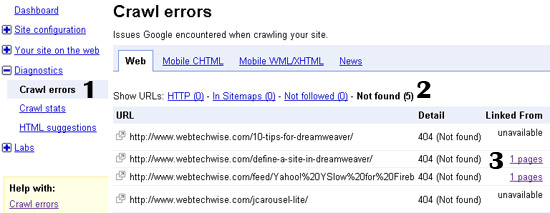
1. Click on Diagnostics from the left menu and select Crawl Errors.
2. Select the Not Found category.
3. If available, click to view which page contains the broken link.
4. To make sure that the URL is indeed indexed in Google, copy and paste the URL into Google’s search and see if any result comes up.
(PLS FOLLOW THE BELOW ILLUSTRATION)

Detecting invalid pages that are indexed by Google


Removing URLs from Google’s search results

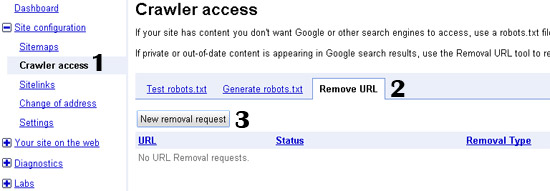
1. Click on Site Configuration, and select Crawl Access.
2. Select Remove URL.
3. Click on New removal request.
(PLS FOLLOW THE BELOW ILLUSTRATION)

Removing URLs from Google's search results


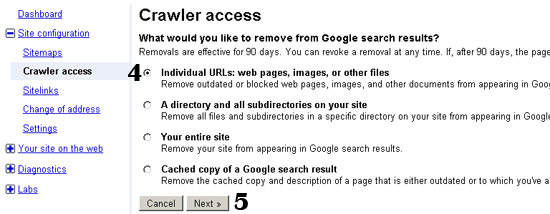
4. Select the first option to completely remove a page from Google search results.
OR
Select the fourth option in case you want to retain the page in search results but would like to remove the cached version of the page. This is useful in case Google displays an outdated version of the page in the "cached" link.
5. Click on Next.
(PLS FOLLOW THE BELOW ILLUSTRATION)

Removing URLs from Google's search results

6. Type the URL of the page you would like to remove from Google.
7. Make sure the first option is selected and then click on Add.
8. The URL to be removed should now appear in the list. If you want, you can add more pages for removal.
9. Click on Submit Removal Request.
(PLS FOLLOW THE BELOW ILLUSTRATION)

Removing URLs from Google's search results

Your request is now pending—in most cases, it only takes 2 to 3 days for Google to remove the URL.
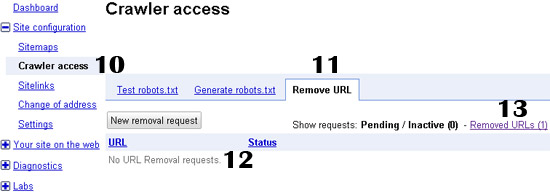
10. Click on Site Configuration and select Crawl Access.
11. Select Remove URL.
12. Make sure the URL you requested to remove does not appear in the list of pending requests.
13. Click on Removed URLs to see that the URL is now listed there.
To make sure that the URL was indeed removed from Google, copy and paste the URL into Google’s search box and see if any result comes up.
(PLS FOLLOW THE BELOW ILLUSTRATION)

Removing URLs from Google's search results


CITaTioN:
http://sixrevisions.com/website-management/find-remove-broken-links/